Quick Settings
Quick Settings
Overview
Quick Settings gives you fast access to commonly used device controls. You can turn features on or off without opening the full Settings app.
Quick Settings includes controls for connectivity, display, recording, device access, and system functions.
Open Quick Settings
- Swipe down from the Status bar at the top of the screen.
- Swipe down again to open the expanded Quick Settings panel.
- Tap a tile to enable or disable the feature.
Some tiles can be pressed and held to open detailed settings.
Brightness
- Open Quick Settings.
- Locate the Brightness slider at the top.
- Drag the slider:
- Left to decrease brightness
- Right to increase brightness
Adjusting brightness improves visibility and can help conserve battery power.
Internet (Wi-Fi & Mobile Data)
- Open Quick Settings.
- Tap Internet.
- Turn Wi-Fi or Mobile Data on or off.
- Select a Wi-Fi network to connect.
You can also view additional available networks.
Bluetooth
- Open Quick Settings.
- Tap Bluetooth to turn it on or off.
To connect a device:
- Press and hold Bluetooth.
- Select the device to pair.
Flashlight
- Open Quick Settings.
- Tap Flashlight.
The camera flash turns on and works as a flashlight.
Tap the tile again to turn it off.
Do Not Disturb
- Open Quick Settings.
- Tap Do Not Disturb.
Calls, notifications, and alerts are silenced based on your settings.
Tap the tile again to disable it.
Alarm
- Open Quick Settings.
- Tap Alarm.
This opens the Alarm app, where you can:
- Create new alarms
- Edit existing alarms
- Turn alarms on or off
Airplane Mode
- Open Quick Settings.
- Tap Airplane Mode.
Airplane Mode disables:
- Mobile network
- Wi-Fi
- Bluetooth
Tap the tile again to turn it off.
Device Controls
- Open Quick Settings.
- Tap Device Controls.
Control supported smart devices such as lights or other accessories.
Auto-Rotate
- Open Quick Settings.
- Tap Auto-Rotate.
The screen rotates automatically between portrait and landscape.
Tap again to lock the orientation.
Battery Saver
- Open Quick Settings.
- Tap Battery Saver.
Battery Saver reduces background activity to extend battery life.
Tap again to turn it off.
Screen Cast
- Open Quick Settings.
- Tap Screen Cast.
- Select the device to cast to.
Your screen will appear on the selected display.
Screen Record
- Open Quick Settings.
- Tap Screen Record.
- Tap Start.
To stop recording:
- Open Notifications.
- Tap Stop Recording.
Microphone Access
- Open Quick Settings.
- Tap Mic Access.
This allows or blocks apps from using the microphone.
Tap again to change the setting.
Camera Access
- Open Quick Settings.
- Tap Camera Access.
This allows or blocks apps from accessing the camera.
Tap again to change the setting.
NFC
- Open Quick Settings.
- Look for NFC unavailable.
Note: The Senifone S1 does not have NFC hardware.
Quick Settings may show NFC unavailable, but NFC cannot be turned on or used on this phone.
Features that require NFC, such as contactless payments or NFC pairing, are not supported.
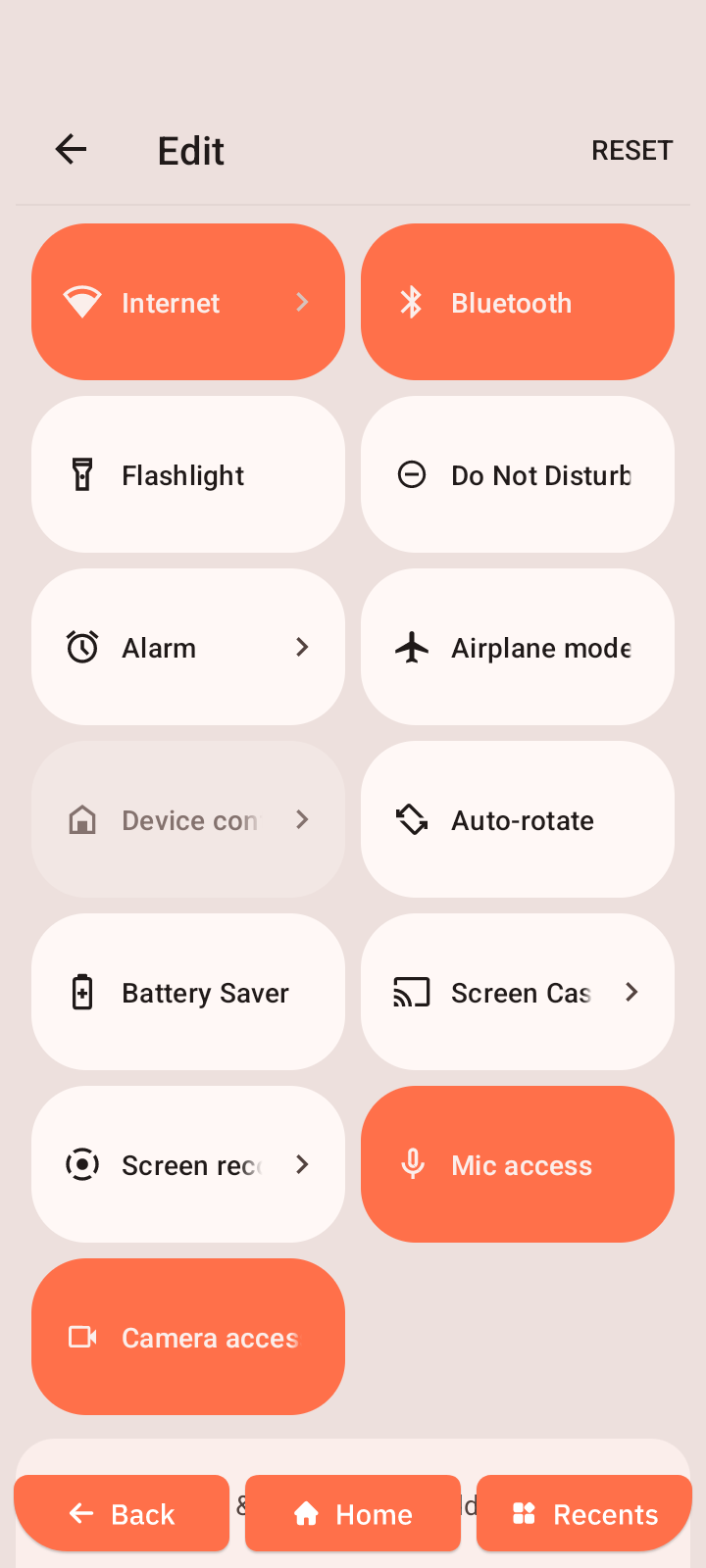
Edit Quick Settings
- Open Quick Settings.
- Tap the Edit icon.
- Drag tiles to:
- Add tiles
- Remove tiles
- Rearrange positions
Common shortcuts include:
- Brightness slider
- Wi-Fi
- Bluetooth
- Flashlight
- Do Not Disturb
- Alarm
- Airplane Mode
- Device Controls
- Auto-Rotate
- Battery Saver
- Screen Cast
- Screen Record
- Mic Access
- Camera Access
- NFC unavailable
- Settings (gear)
- Edit (pen)
This allows you to customize which shortcuts appear in Quick Settings.